Showing posts with label assisitive technology. Show all posts

Sunday, September 18, 2011

Do It Yourself Directions

School districts and educational agencies are feeling the economic crisis in painful ways.  Doing your own adaption can save valuable resources for other things.  Often times self-adapted items work as well or better than commercial items.

Additionally making adaptions to items can be a create way to build community during a professional development day.  Gather items you may need for adaptions and store in a central location, then you can grab it and get together with colleagues for an afternoon of purposeful fun.

Adaption Toolbox Items
  • craft, hot and crazy glue (plus glue gun)
  • various kinds of tape
  • sticky tack
  • scissors
  • soldering iron, solder
  • notching file
  • clamps
  • tacks
  • brads
  • dollar store items (things from the toy, craft, kitchen goods and hardware aisles)
  • "junk drawer" items
  • allen wrenchs
  • screw drivers and screws in all sizes
  • hammer and nails in all sizes
  • assorted nuts and bolts
  • cable ties
  • velcro
  • goo gone (or similar)
  • disinfectingwipes/alcohol based sanitizer
  • x-acto knife or similar
  • sandpaper
  • staples and stapler/staple gun
  • foam core board
  • contact paper
  • epoxy
  • switch componets, wire, speakers, assorted electronics
  • PVC Pipe
  • Triwall Cardboard
  • Loc-Line
  • first aid kit
Here are directions to make various adaptations for your students.

School Tools
Activities of Daily Living
Augmentative and Alternative Communication
Switches/Switch Accessible
Leisure/Play
Academic Helpers
CVI Interventions
Helpful Information

Wednesday, February 23, 2011

Saturday, June 6, 2009

What should I get for my new room?

I have a feeling I have answered this before, so fogive me, but I have been e-mailed a couple of times recently by new teachers or teachers changing to a new population asking what they should ask for as the building blocks of adapted devices/assistive technology for their new classroom of learners with severe or multiple disabilities.

Although the specifics will vary depending on the age group, the budget, the computers and other educational technology available in the room and other variables here are the items I would ask for:
Note: try using the search feature to search this blog for ways to use any of these items.

Other fun things to consider:
  • the Webber Functional Communication Game gets TONS of use in our classroom (I won it as a door prize at a conference a couple of years ago and it is one of my most prized possesions)
  • All About Me, All About You and Yes or No also get lots of use (although I often re-word questions based on the student to allow them to be answered using a particular communication system)

Some friendly advice:
Make sure you know the warranty and repair policies of the companies you are ordering from as well as their reputation for making durable products:
Also keep in mind pretty much every AT company require a return authorization number for returns or repairs - so call first!

Monday, December 1, 2008

Running Programs from a Flash Drive


One of the challenges of working with technology in a school system is that you often don't have "administrative" privileges on computers to run or install software and because software that is vital to our classrooms is often not vital to the rest of the school we have come up with creative solutions.

One solution is to run smaller and somewhat simple programs from a flash drive, thus altogether avoiding the need to install programs to a computer. This isn't easy because most software isn't designed to be run from a flash drive.

One solution (and this is likely one of many and it only works on Windows) is to use a flash drive with a U3 system (like the SanDisk drives). U3 is an operating system that allows programs to run directly from the flash drive. However programs must be converted to work with U3 and as you can imagine many of the programs we find useful with our students are not available in u3 compliant format.

Luckily there is some free software that can convert (smaller, simplier) programs to be U3 compliant. It is called Package Factory. To make everything even better their is a tutorial on Techbytes. I spent a couple hours trying to convert two programs over the weekend and today at school one of them worked instantly running off the drive. The other one... well I am not sure I can make it happen but I will give it a try soon.

I haven't tried all of the programs below, but they might be worth a shot:
Also I did get the Classroom Suite Viewer that comes with News-2-You membership (and with Aimee Solutions Programs) to work.

Monday, January 7, 2008

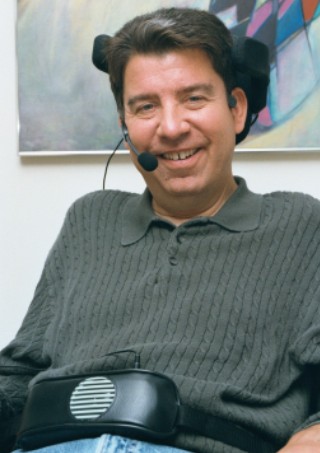
Voice Amplifiers


Voice amplifiers are sometime the perfect moderate tech solution for learners who have soft or somewhat unclear voices. They can also be the prefect motivational tool for learner with low verbal abilities or help learners with hearing impairment with articulation. Here are some links to voice amplifiers:


Voicewave and Luminaud have funding advice/assistance.

One tip, get the behind-the-neck microphone it is the most comfortable and works the best.

Contact Me at:

Contact Me at:

Visit our advertisers:

Fujitsu Computer Systems Corporation SpinLife.com, LLC Try Nick Jr. Boost FREE for 7 Days LabelDaddy.com ... Label the things you love !! Build-A-Bear HearthSong - Toys Outlet