Dynamic Keyboard is a free software program that provides a reduced target on-screen keyboard with word prediction.
The keyboard is difficult to explain in words but it offers a simple interface to enter text using reduced keys on the screen. Watching a video is a better way to understand how it works, Dynamic Keyboard can be seen below in use by an typist using the (also free) myEye eye gaze tracking program. Other access methods include Intellikeys, a mouse or mouse emulator, joystick, track ball and head tracking. I had excellent success using it with the free head tracking program Camera Mouse.
Resources and ideas for teachers of learners with severe, profound, intensive, significant, complex or multiple special needs.
Showing posts with label eye and head tracking. Show all posts
Wednesday, March 30, 2011
Thursday, January 21, 2010
Looking at the Tobii C-Eye
Over the past four months I have had the wonderful opportunity to explore a number of eye tracking communication devices with one of my students and her family as we move through the process of selection. Just yesterday we met with our wonderful Tobii rep, Chris, to try out the Tobii C-Eye. About nine months before Chris had visited and my student tried out the Tobii P-10, which is also an eye gaze device. Since then she has trialled essentially every eye gaze device on the market (the Eyemax, the Erica (now owned by Dynavox) and the Eco). The trial was a joy from the word go. Some of the things that made it wonderful were that the user knew what to expect from calibration and for the first time was able to calibrate a device, she had been exposed to the board sets because we had been sent a trial copy of the Tobii Communicator Software to look at and we use SymbolStix (the picture symbols on the Tobii) everyday. Also our rep was able to both engage the user and answer the question of the SLP, myself and the family at the same time (that takes some doing). Additionally the student was able to keep on her bifocal glasses, which she was unable to do in any other device trial. Also we were able to remove her chest strap and give her the freedom to move backwards and forwards in space and access still wasn't and issue. The best part of the trial, by far, was when at the very end the TEAM started chatting and the user was left to explore (sort of by accident). So she launched an American Idol video in Windows Media Player! We were stunned and she laughed!
Beyond the trial the Tobii Communicator software really is a joy to use. I am such an "old timer" at Boardmaker Speaking Dynamically Pro and at some of the other devices at the market that sometimes I have a hardtime rewiring my brain to do new devices, however the Tobii is a breeze. It converted all sorts of Boardmaker SDP files over no problem (except it doesn't drag and drop - although none of my boards do that since none of my students do that). You can do all the fancy things you can do in other programs from shuffle to stretch to instantly resize and often times without hitting as many buttons as you need to in other software programs. I am excited to be running a trial of an AAC device for a student on a program that is so easy to learn to use.
Tobii is a local company for us, just a few towns over, which makes arranging the next step of our journey towards an eye gaze AAC device for this user a little easier (renting a device to collect some data) as there is no shipping involved. It will take about 30 minutes for someone to go pick up the trial device once our name comes up on the waiting list. Hopefully our user will have one of her own soon!
Apologies to Chris for calling him Brian in the frist version of this post... someday I will get better at names! Chris is one of the best AAC Vendor reps I have worked with.
Thursday, October 22, 2009
Free and Low Cost Head and Eye Tracking Software

Updated March 30, 2011
Free and Low Cost Head Tracking Software (note head trackers can usually track any body part and more so if you put reflective tape, shiny nail polish or an LED on that body part)
Note and Tips:
- Head Tracking and Eye Gaze Tracking are two very different things. Head tracking uses a camera to translate a body part movement, typically the head, into mouse movement. Eye Gaze Tracking is more complicated, using one or more cameras to translate slight movements of the eye into mouse movements. Please do not use the terms interchangeably.
- Head Tracking can generally track any body movement - a toe or finger or elbow should work as well as a head to these systems
- Many head tracking systems work better if you use a dot of metallic nail polish, aluminum foil or reflective tape (you can get this in bike stores) to make it easy for the camera to stay on one spot
- Free and low cost systems often do not have the features commercial systems have, for example you many need to install addition autoclick or dwell click software and you will not have as much (or any) access to tech support
- Camera Mouse is for Windows XP, Vista and 7, uses a webcam and is free
- Cam Space is free body part or object tracking software
- Enable ViaCam uses any webcam to track head movements
- Free Track is free, opensource head tracking software that many other programs are based on
- HeadDev is an ipen source, Windows based head/body part tracker that uses a webcam (English info)
- iTracker for Mac, uses webcam $29.99
- HeadMouse3 uses any webcam for free to do head tracking
- Open Gazer Head Tracking Version free head tracking software using a web cam
Free and Low Cost Eye Tracking Software
- ITU Gaze Tracker is a free eye gaze program for Windows that works with a webcam
- myEYE is a free eye tracking program for use on Windows with a high resolution webcam
- Open Eyes has directions to build two different user worn eye gaze systems
- Open Gazer is free eye gaze software for Linux that works with a webcam
- Dwell Clicker free software to allow hovering over an item to trigger a click
- Point and Click free software for dwell and auto clicking
- Use a switch set to "mouse click" or "enter"
Friday, October 2, 2009
Tone Matrix (and some things for your iTouch)
Tone Matrix is designed as a tool to write/create music. For our learners it can be a fantastic tools to use light and musical tones to encourage cause and effect using a touch screen, interactive white board or even a head or eye tracker.
Imagine one of your learners swiping his hand across the SMART Board to to make a glowing song and then clicking a switch (set to "space bar") to clear that song and make another!
If you are lucky enough to have an iPod touch or iPhone for your classroom you can do pretty much the same thing wigh the app Melodica or in color with the app Tripper. Another cool app that doesn't look like these (it is prettier), but meets the same purpose is Bloom (and I think it sounds beautiful).
Thanks to NCS Tech for the Tone Matrix tip.
Imagine one of your learners swiping his hand across the SMART Board to to make a glowing song and then clicking a switch (set to "space bar") to clear that song and make another!
If you are lucky enough to have an iPod touch or iPhone for your classroom you can do pretty much the same thing wigh the app Melodica or in color with the app Tripper. Another cool app that doesn't look like these (it is prettier), but meets the same purpose is Bloom (and I think it sounds beautiful).
Thanks to NCS Tech for the Tone Matrix tip.
Sunday, September 28, 2008
Eye Gaze Communication Review - A Guest Post

1) Just because the concept of eye gaze is simple, reading eye gaze is not necessarily easy. We need practice and experience to become competent partners. Not all kids use the same techniques, in part because the end goal for each child may not look the same (see #2).
2) Eye gaze response procedures should keep in mind technologies to be used in the child's future. If a child will be using a dwell-click with head mouse or eye gaze software, for example, then it is important that they learn to hold their gaze to a choice for a specific length of time. Children who will not be advancing to a head mouse or eye gaze may find it beneficial to confirm their choices with eye contact to the communication partner, especially if they are socially motivated.
3) Similarly, if head mouse use is in the child's future, helping them learn to turn their head along with their eyes will support that technology. This can roughly be considered "nose pointing," although the child is merely directing the nose toward the choice, rather than touching it with the nose. If head mousing is not in the child's future or if you plan to go with eye gaze not head mouse, it's fine to hold the head still and cast long sideways glances with the eyes.
4) Motor ability must be considered. The length of dwell to a choice should be reasonable...five seconds (a standard dwell time expectation in too many IEP goals, sad to say) is WAY (WAY!!!) too long for most children, both in terms of head stability and attention span. Try it...five seconds is an ETERNITY and it slows conversation down to a pathetic pace. At our house, .90 seconds is a good dwell time and doesn't interfere with the flow of communication.
5) Positioning yourself as a receiver is very important. You must be able to see the child's eyes clearly. However, some children fixate on the face of the reader, so you need to be flexible. Head-on (180*) will work for students who do not fixate on faces, but for children who are hyper-fixated on faces, an angle just over 90* may be more appropriate. You learn from the child what they need as far as positioning in relation to the partner.
6) Children with hyper-fixation to faces may benefit from loose symbols held side-by-side in front of the reader's face, then slowly moved apart. The child's eyes will (hopefully!) follow the intended choice as they move.
7) Boards intended for finger-pointing tend to have symbols spaced too closely for all but the most skillful eye gaze readers (and users). Loose symbols allow you to distance the choices at optimal points from the user. These can be held in the hands or affixed to velcro-sensitive boards (I personally like 3"-wide strips of indoor/outdoor carpet mounted to mat board, 15-18" long. Post-It makes poster board that can be cut into strips that holds symbols temporarily as well).
8) Not all days are necessarily the same. Some "off" days may require few choices spaced at farther distances, while other "on" days may allow a child to handle many choices placed closer together.
9) Along these lines of "off" and "on" days, if the child suffers neurological swings, it is imperative to tailor our expectations to the child's ability at the time. This may sound basic, but it is a point often overlooked in our hurry to take data.
10) Some children do very well with fixed frames. These are nice because they free the partner's hands and can often hold many choices. There are directions for some wonderful PVC frames online. There are also commercial e-Tran frames of Plexiglass (Cogain and others). Again, you must keep in mind the child's preferences and tendencies to fixate...
11) The goal of eye gaze communication is COMMUNICATION! It is NOT testing! Kids pick up on the fact that they are being heard or being tested, so make sure you honor what they tell you!!! This is probably the single most important point in all the discussion of eye gaze. For some reason, we tend to doubt eye gaze responses. This is because of our OWN insecurity in reading the answer correctly. If we honor a child's response, they learn to trust us as communication partners. If they indicated what they intended, we validate their answer. If they answered in error, we STILL validate their answer and demonstrate that we honor what they say. The children learn they must change their strategy to communicate the accurate answer and that they must find ways to negotiate to get what they had meant to tell us.
12) When you are unclear of a child's answer, DON'T repeat the same question. Ask it a different way. Try asking it in a way that would require they show a different answer ("Do you need more time?" becomes "Are you all done then?"). Show respect by letting the child know that you are the one having difficulty understanding; it is not the child's fault.
13) Try to keep the same placement of symbols offered for choices. This allows the child to develop motor automaticity. You may start to see eyes heading to a location before a symbol is even offered; this definitely suggests the child has achieved motor automaticity.
14) Not all children need to demonstrate "scanning of all the options" before making a selection. Motor automaticity may come to play, as well as peripheral vision skills. This does not mean kids aren't expected to know what all the choices are, but it does mean that "scanning" them may not look quite like we expect. An example is this: A teacher offered my child yes/something different/no in the same order each time (hurray! Way to build motor automaticity!) but would not accept the answer until she had gazed at each choice first. This is both unnecessary, slows communication, and discounts motor automaticity).
15) As soon as possible, eye gazers need to have introduced an option to indicate that what they want to say is not among the choices. This can be most anything ("something else," "not here," "different idea," whatever works for you and the child), but it is not fair to force a child into choosing only between choices they don't really want. Otherwise, the only option we give them is to NOT choose...and then we've set them up to be labeled as "non-communicative."
There are usual communication strategies that we can't forget: motivating topics, making the child responsible for sharing information that they alone would know (highly motivating!), respecting the answer, GENUINE conversation...
I hope this helps. Again, it's just what I've learned from walking in the trenches.
Rose-Marie
Tuesday, August 12, 2008
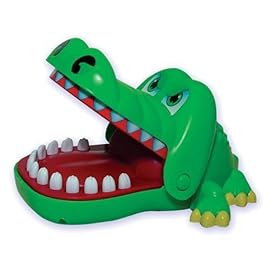
Crocodile Dentist

Remember the Crocodile Dentist game? Maybe you had one as a child, maybe your friend had one, or maybe (like me) you just saw the commercials and wished you had one. Now Hasbro has an online version everyone can play for free. It works fine with touch screens and should work well with eye gaze and head trackers with some way to "click". Enjoy! (You might want to enjoy it with the sound off, it gets annoying.)
I am pretty sure I got this link from Barrie at One Switch.
P.S. I am in awe of the summer site statistics. Since June first there have been just barely under 27,000 visits to the site and 84 MP3 downloads of blog entries via Odiogo. And it's summer! And I wasn't posting some of that time because I was sick! Good thing more and more intensive/severe/profound special needs blogs are popping up to fill the need for this kind of information!
Monday, February 4, 2008
Alternate Access Methods
These links connect you with porducts that allow individuals with disabilities to access technology through alternate means such as eye gaze, muscle movements or head tracking. (Updated July 3, 2008.)
- Applied Science Laboratories Company
- Boost Technologies Company (Tracer)
- Brainfingers Company
- CameraMouse (FREE!!!!)
- Eagle Eyes (FREE with approved application)
- EMG Switch (D-Switch)
- ERICA
- Eye Can Company
- Eye Gaze Company
- Eye Tech/Quick Glance Company
- Head Mouse Extreme from Origin Technology Company
- IBM Head Tracking Pointer (FREE)
- InvoTek Accu Point (NEW head tracker)
- Jouse Company
- MCTOS Brainwave Switch Info Page
- Natural Point Company
- NaviGaze from Cybernaut Company
- New Abilities Tongue Touch Keypad
- PCbility Mouse Company
- PRC Tongue Switch
- Quadjoy Company
- Qualieye from Qualilife Company
- SCATIR Switch
- Tetramouse Company
- Tobii Company
- Tracker from Madentec Company
- Turk Head Switch
- Use Your Head Gesture Central Company
- Visioboard Company
- Wild Divine Biofeedback Company
- Words+ IST Switch
Thursday, September 13, 2007
CameraMouse Finally Available for Free!

As I mentioned the end of last school year Camera Mouse is now available for free from Boston College. All you need is a web cam and you are good to go! It is comparable to similar tracking software that runs hundreds to thousands of dollars. Free software for use with head trackers is also available.
Read my previous post for more information.
Saturday, June 30, 2007
Free Software for Eye and Head Tracking
Boston College's Eagle Eye Program has available for download the following games and application for use with their or other Eye and Head Tracking programs:
Games
Aliens - shoot the aliens before they disappear
Blackjack - classic card game
Bug Sprayer - spray the bugs as they get bigger and bigger
Connect 4 - get four in a row before your opponent
DressMe - mix and match the doll's clothes
Eagle Paint - create a beautiful work of art
Matching Game - game of concentration
Othello - capture more colored discs than your opponent
Pong - virtual table tennis
Question Game - create your own multiple-choice quizzes
Tic Tac Toe - get three in a row
Spell and Speak
EE Onscreen Keyboard - keyboard utility that works with cut-and-paste and direct input
Midas Touch - modified keyboard designed for EE and CM
Rick Hoyt Speller - select each letter by its group
Staggered Speech - spell and speak utility
System
Applications Manual - description of useful applications
Chat Client - connect to talk and play with other EE and CM users
Eagle Scope - configuration utility for EE
EE Browser - web browser designed for EE and CM
EE Connect instructions - how to use the EE Connect program
EE Connect update - downloaded updated EE Connect files
EE CM Software Manual - discription of available software for CM
No word official word on when CameraMouse will be available for free download, but it should be any day now!
Subscribe to:
Posts (Atom)