Showing posts with label communication. Show all posts

Wednesday, July 11, 2012

If I Were in Charge of Research and Development at an AAC Company...

  • prices would reflect what the device costs to research, develop, manufacture and distribute - not the highest price health insurance or medicaid will pay
  • every device would weight less than 4 pounds
  • a carrying handle would be integral to every design
  • every device would be durable enough for 16 hours a day of daily use every where they might be used
  • devices would automatically back up - their to the "cloud" or to an external hard drive or other computer
  • there would be a small display showing what the user is working on so the communication partner is in the know or there would be, at the very least, an LED light that signaled a message is being created and to wait
  • all devices would have hot swap batteries (kudos to the Zygo Optimist for being the first in the field and to the Tobii for using on all their C series devices)
  • all devices would have external volume controls
  • their would be a search feature to make finding and linking boards less of a chore
  • instant skype or video chat with tech support on the device 
  • front and rear video/still cameras with adjustable aim (I have more pictures of ceilings taken by my Tobii user!)
  • everything integrates with everything - compose your message and then speak, text or email it all from the same place (Dynavox does this well in the InterAACt software)
  • consistent symbol set use within communication board software (no mixed sets)
  • built in user communities where users can talk to other users while using their devices
  • a means to strip personal information from boards and board sets to be able to share them confidentially
  • AAC companies working with curriculum companies so that board sets relating to theme unit or subjects can be purchased and installed
  • integrated access to the web regardless of access method (yes, I know that is a big dream)
  • speech banking for those with progressive disorders so that early implementation can be for banking speech which is then available when needed for the user
  • high tech PODD sets (that I don't have to make myself)
  • online board/page creation and back up
  • quick printing of the board/pages on the device to make manual backups
  • integrated alternative assessment features
  • DAISY/AMIS reader (good job Dynavox)
  • integrate with Bookshare
  • glare proof screen
  • data collection and analysis on device use, access, language used, etc.
  • water resistant designs
  • usb ports, lots of them, and not in hard to reach places
  • bluetooth/SMS/MMS/E-mail/wi-fi all built in (most devices have this in the "open" version)
  • instant on and instant off features
  • media features in the communication software that allow full control over media (flip through album covers, choose songs and movies, etc)
  • plenty of memory for storing music, movies, etc

Monday, April 18, 2011

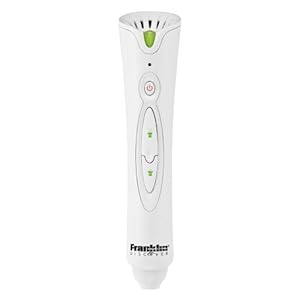
AnyBook Reader -Off the Shelf Adaptable AT

The Franklin AnyBook Reader is designed to make any book and interactive, "read to me" book.  Essentially you attach special stickers to the pages of books and then when you touch the pen to the sticker it plays back a self-recorded message.

The Franklin AnyBook reader could be used in so many ways for learners with multiple special needs.  Here are a few I have thought of:
  • use with manual communication boards as a mid-tech AAC device
  • use with visual schedules or task strips as a prompting device
  • use with social stories as a means of independent access to text for non- or early readers
  • use with a cookbook to read recipes
  • use to say the Pledge of Alligiance
  • use for sequencing activities - be it math, phonemes or story sequencing
  • use to label colors for those with visual impairments
  • use to record messages from home to school and back
The Franklin AnyBook Reader come in a 15 or 60 hour edition, costing about forty to fifty five dollars.  It uses double AA batteries to run and comes with 400 reusable, removable stickers.

You can even check out the AnyBook Reader Blog.

Thursday, April 14, 2011

Eyegaze for Education: Women and Girls with Rett Syndrome


Many thanks to the Rett Syndrome Association Massachusetts for hosting me for this presentation.


Also thank you to everyone who watched the live broadcast of this workshop on Ustream.TV!

I apologize for the technical difficulties. It was a first time thing, broadcasting a workshop and I learned a lot.

Ingrid Harding of Girl Power 2 Cure taped (most) of the broadcast, which is seen below.


Please comment and let me know if you saw the broadcast! (I never saw the social stream.)

Saturday, August 21, 2010

The Communication Matrix and Seven Levels of Communication

The Communication Matrix describes seven levels of communication:
  1. Pre-intentional Behavior
    1. the behavior is not under the individuals control
    2. the behavior is not intentional for communication 
    3. the behavior reflects the state of the individual, 
    4. the behavior is not yet differentiated
    5. interpretation of the behavior is dependant on the communication partner
    6. example - crying may mean hungry, uncomfortable or tired
    7. in typical development this occurs from 0-3 months
  2. Intentional Behavior
    1. the behavior is under the individuals control
    2. the behavior is intentional for communication
    3. caregivers continue to interpret behavior
    4. example - differentiated vocalization meaning hunger
    5. in typical development this occurs from 3-8 months
  3. Unconventional Pre-Symbolic Communication
    1. behavior is under the indivduals control
    2. the behavior is intentional for communication
    3. the behavior is non-symbolic
    4. the behavior is not "socially acceptable" as we grow older
    5. example - tugging someone to the location of a desired item
    6. in typical development this occurs from 6-12 months
  4. Conventional Pre-Symbolic Communication
    1. behavior is under individuals control
    2. behavior is intentional for communication
    3. the behavior is non-symbolic
    4. the behavior is "socially acceptable" as we grow older and we continue to use them
    5. the behavior may be related to culture (shaking head for no)
    6. example - pointing to a desired object or waving "bye-bye"
    7. in typical development occurs between 12-18 months
  5. Concrete Symbols
    1. concrete symbols look, feel or sound like the thing they represent (parts of items, miniature items, photos, line drawings)
    2. example - patting chair to mean sit down or using a picture of a shoe to mean shoe
    3. this stage is con-current with conventional pre-symbolic communication and language based communication in typical development between 12-24 months (not usually a separate step in communication development)
  6. Abstract Symbols
    1. symbols are not related to the meaning for the symbol (i.e. picture symbol for want, most spoken words, printed words, sign language words that do not resemble the action/item)
    2. symbols are used one at a time
    3. in typical development this occurs from 12-24 months
  7. Language
    1. symbols both concrete and abstract are used in combination to express an idea or thought
    2. combination of symbols follows grammatical rules
    3. individual understands symbol order impacts meaning
    4. in typical development this occurs from 24 months and older
Each of these seven levels calls for different teaching interventions and methods to facilitate learning in our students.  We know that all of these levels of communication have two basic meanings - to obtain or to avoid (aka to get or to get away).  Within those two basic meaning we can desire to obtain or avoid attention, tangible items and/or sensory experiences, which brings us to six basic things to communicate.  Our job is to meet our students where they are at in this six basic communicative purposes and to us shaping to bring that current means of communicating to the next level.

This means we might play simple contingency games, i.e. spinning a favorite toy and waiting for an indication of pleasure (smile/laugh) before repeating the action, thus reinforcing that this non-symbolic communication.  It might also mean requiring a different student say or use a method of AAC to say a full sentence, "I want more, please" before we repeat the same action, this time reinforcing language.

If we understand where our students are, where we would like them to go and how to embed appropriate communication instruction strategies into every moment of the day our students will become better communicators.

Friday, January 1, 2010

A Fan of Fans

Number FanLearning fans are educational props that are used more in the UK and Australia than in the US.  In our classroom they can be used as visual cues, communication aids and even low tech eye gaze communication.  Students can point (or look at) a choice, a match, an answer, what's next in the schedule, etc. 

Communication/Social Skills

Literacy/Language

Numeracy/Math
Blank Fans

Thursday, October 22, 2009

Five Ways to Play

Our speech therapist runs a fun group every Thursday and this week we played, "Where is it?" She had small containers filled with fun size candy bars. Students volunteered to hide a container while the other student hid their eyes. (All with assistance as needed, of course.) Then the other students asked the "hider" yes/no questions starting with "Is it..." using position words (under, next to, on top of) and items in the room (desk, shelves, refrigerator, stander). The "hider" then answered the questions until someone guessed the location. In the end everyone got to eat or at least "taste" some candy.

Five out of six of my students where in school today and below you will see images of how each of those five students participated.

From left to right: A Mercury communication device by ATI with a keyguard using direct selection, a Go Talk 20+ from Attainment, four picture custom made low tech eye gaze boards, a TechTalk by AMDi and textured Yes/No board and a Yellow Big Red switch by Ablenet attached to a Step by Step Sequential Switch (not pictured).

IMG00731-20091022-0925.jpgIMG00739-20091022-0927.jpgIMG00737-20091022-0926.jpgIMG00727-20091022-0924.jpgIMG00734-20091022-0925.jpg

Contact Me at:

Contact Me at:

Visit our advertisers:

Fujitsu Computer Systems Corporation SpinLife.com, LLC Try Nick Jr. Boost FREE for 7 Days LabelDaddy.com ... Label the things you love !! Build-A-Bear HearthSong - Toys Outlet