When writing up Imagetalk for the last post I discovered they have a couple of free downloads and began playing around with them. The first is the Imagetalk Book Editor Feature. Book Editor allows you to make communication books to be sent wirelessly to the Imagetalk device of your choice. Soon, however, it will allow you to print the books, which would make paper communication boards. Book Editor allows you to download five symbols sets (Imagetalk, PCS, Pictograms, Bliss Symbolics and a set for the Butterfly Environmental Control Feature. Once you understand the basics, which I "got" in about twenty minutes but playing around and using the help features, but could also be learned from the PDF Manual, you can make a board/book in about five minutes. The system is intuitive using drag and drop, which makes so much more sense then the switching from the board to the symbol finder like you do in Boardmaker. However, there are only a few page set up features and your symbols will end up in a grid of your choosing. Thus the simplicity and ease of Book Editor limits your flexiblity considerably in board design compared to Boardmaker. Book Editor runs on the Java Platform, which means you will need Java Runtime Environment (which you probably already have). The program runs "online" meaning once you register and have a password you can share books with other users with ease. Book Editor runs on Mac or Windows.
Sunday, December 17, 2006
More About Imagetalk
When writing up Imagetalk for the last post I discovered they have a couple of free downloads and began playing around with them. The first is the Imagetalk Book Editor Feature. Book Editor allows you to make communication books to be sent wirelessly to the Imagetalk device of your choice. Soon, however, it will allow you to print the books, which would make paper communication boards. Book Editor allows you to download five symbols sets (Imagetalk, PCS, Pictograms, Bliss Symbolics and a set for the Butterfly Environmental Control Feature. Once you understand the basics, which I "got" in about twenty minutes but playing around and using the help features, but could also be learned from the PDF Manual, you can make a board/book in about five minutes. The system is intuitive using drag and drop, which makes so much more sense then the switching from the board to the symbol finder like you do in Boardmaker. However, there are only a few page set up features and your symbols will end up in a grid of your choosing. Thus the simplicity and ease of Book Editor limits your flexiblity considerably in board design compared to Boardmaker. Book Editor runs on the Java Platform, which means you will need Java Runtime Environment (which you probably already have). The program runs "online" meaning once you register and have a password you can share books with other users with ease. Book Editor runs on Mac or Windows.


AAC Devices from Overseas
 Today on TLWMSN we feature two AAC companies from overseas who carry products we generally don't see in the USA. The first company is Smartbox, of the UK. They carry four unique dynamic display devices (at least I think they are unique) and one Zygo device, the Talara. The Powerbox and Slimbook devices are very high tech AAC and computer system with environmental controls, the Powerbox is designed for wheelchair mounting and the Slimbook for ambulatory individuals. The Future Pad (pictured left) is for wheelchair or ambulatory use and does not have environmental controls, although they can be added. Finally, there is the Casio Handheld which is a palm pilot sized device which runs the Pocket Grid Software.
  The dynamic display devices utilize either The Grid for symbol communication or the Windbag for text communication, which are both produced by Sensory Software International. The Grid uses the Widgit Company Rebus Communication Symbols.
Next we have the Imagetalk Symbol Writer by Imagetalk, a subsidiary of a Finnish Company called Lingsoft, Inc. Imagetalk is a rather unusual communication software system which avoids grids, focuses on visual appeal and displays functions and content on the same page,
Saturday, December 16, 2006
Picture Communication Symbol Sets Update
I missed a few picture communication symbol sets when I posted on November 24th .
 First up is Libsyms from the Liberator Company in England. There are 30,000 Libsyms (far more than the approximately 10,000 Mayer-Johnson PCS. This may be do to separate symbols that add suffixes like "ly", "ed", "s", "er" and "est" to the main symbol for any concept. Libsyms also promises that as upgrades are added they will be free to those who own the system. Liberator seems to have made efforts to make their symbols multi-cultural and aligned to the UK's national curriculum. They even include expletives. The cost is 250 pounds which is about $488.
 In order to balance that price I will present a totally free program next. Sclera Pictos is a set of picture communication symbols for the visually impaired created in the Netherlands. The website is in Dutch and in English. There are over 1,000 symbols on the site, which can be downloaded, about 400 symbols are available translated into English. This download was a lot easier on my computer than the download of the Imagine Symbols.
 The Royalty Free Clip Art for Foreign Language Instruction is another resource for black and white images. These free images are cartoonish line drawings which can be browsed online and downloaded individually.
 The Open Clip Art Library holds thousands of vector drawn clipart images that double nicely as picture symbols. You can browse the library online or download all or some of it. The images are, for the most part, very clear and would fit nicely on communication boards or curriculum items. Some of the images are color and some are black and white.
Friday, December 15, 2006
Web Site of the Day - Tux Paint
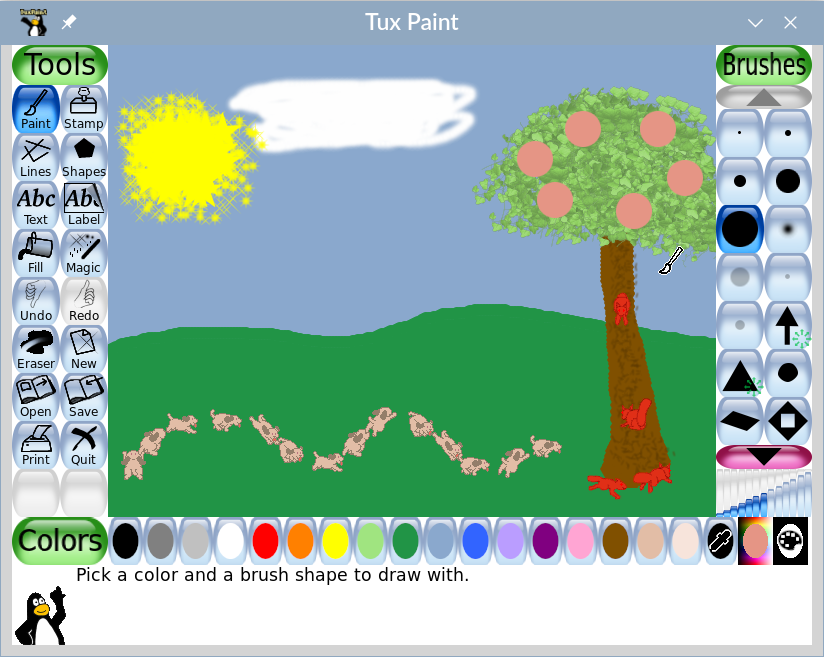 Tux Paint is a free, open source, award-winning software program for children. It is a paint/draw program similar to Kid Pix, but with a more user friendly interface. Tools includes brushes, lines, shapes, text, sound effects, "magic" effects and teacher controls. It will print and save creations. Tux Paint runs on Mac OS X, Windows and Linux. Tux4Kids is a support forum, should you need it (which is unlikely).
Thursday, December 14, 2006
Website of the Day - Dog Play

When I first started teaching the hospital/school I worked in was partnered with an animal assisted therapy program. My classroom was visited weekly by a beautiful dog named Sallie and her owner. My students loved those visits. They would work harder at physical skills like reaching and grasping to groom Sallie and would use their communication devices to give Sallie commands with less latency and more focus than on most other tasks.
Pet assisted therapy may be, along with music and other expressive therapies, one of the most under-utilized means of improving outcomes and quality of life for learners with multiple special needs. This is sad because many animal assisted therapy program are run on a completely volunteer, free-of-charge basis.
Dog Play is a website which presents a broad range of information about animal assisted therapy. The best part is they link to national and local animal assisted therapy agencies.
Wednesday, December 13, 2006
Website of the Day - CBeebies Switch Games

The Inclusive Technology Company and the Children's BBC in the UK have teamed up to create online switch games for the pre-school set. Although the PBS in the USA have not caught up with this advance they do have a great resource page for parents of special needs children which focuses on technology and inclusion called Inclusive Communities.
Tuesday, December 12, 2006
D.I.Y.
Do It Yourself (DIY) is a hot trend right now. Books, magazines and television shows are devoted to the topic. Here are some website that give helpful instructions for DIY projects for the special needs classroom.
Science Shareware has information on adapting toys. They also give the useful suggestion of enlisting scout troops to adapt toys.
One Switch, a long time favorite site of mine has directions for eleven DIY equipment modifications and more for adapting video games. Be sure to explore the rest of the site too, it's great.
Assistive Technology Partners has ten DIY project tutorials online.
Dale's Classroom Adaption does not have instructions, but the pictures are well worth perusing.
Do2Learn has DIY instruction to make a study tent.
The PVC Book is available in a PDF file and offers useful instruction to make all sorts of adapted equipment.
Braingle teaches us how to make stress balls.
Finally, intended for community based rehabilitation in the third world there is the United Nation Guide to Assistive Devices. Although you probably don't need directions to make a wheelchair or crutches, some of the ideas are useful and reading the document is mind opening. The article made me think more about people with disabilities in developing nations and what I can do to help.
Science Shareware has information on adapting toys. They also give the useful suggestion of enlisting scout troops to adapt toys.
One Switch, a long time favorite site of mine has directions for eleven DIY equipment modifications and more for adapting video games. Be sure to explore the rest of the site too, it's great.
Assistive Technology Partners has ten DIY project tutorials online.
Dale's Classroom Adaption does not have instructions, but the pictures are well worth perusing.
Do2Learn has DIY instruction to make a study tent.
The PVC Book is available in a PDF file and offers useful instruction to make all sorts of adapted equipment.
Braingle teaches us how to make stress balls.
Finally, intended for community based rehabilitation in the third world there is the United Nation Guide to Assistive Devices. Although you probably don't need directions to make a wheelchair or crutches, some of the ideas are useful and reading the document is mind opening. The article made me think more about people with disabilities in developing nations and what I can do to help.
Subscribe to:
Posts (Atom)
Contact Me at:

Visit our advertisers:


