Thursday, May 31, 2007

Awesome Adaptation - Kidstation and Joy-to-Key

A while back I hosted a mini online AAC/AT tour of Japan which showed a KidStation Playstation controller by Bandai being used with Joy-to-Key software to operate a computer. This inspired my blogger pal Barrie of One Switch to purchase a used KidStation, rehab it and offer it for sale (including a Playstation to USB adaptor and a disk with Joy-to-Key) in his online shop. The moment I saw Barrie's post I wanted the KidStation, so I bought it from him (thanks for the deal Barrie).

My idea for it was simple. I wanted to allow one of my students, a music lover who has extremely low vision with some motor and learning difficulties to control iTunes on our classroom computer.

Using Joy-to-Key (which is always available free from One Switch) you can reassign the buttons on any gaming controller or joystick to be what ever you need them to be. The software is pre-set with a few configurations, such as mouse emulation, but to make the KidStation run a media player I had to assign the buttons myself.

Once I sat down at the classroom computer I realized Windows Media Player would be the best choice (mostly because it was already on the computer and iTunes wasn't). So I assigned the left button to go back to the last song (ctrl-b), the right button to go to the next song (ctrl-n), the bottom button to pause/play (ctrl-p) and the top button to toggle the visualizer.

Next I used sticky-back craft foam to make the markings on the buttons tactile so my student with visual impairment can distinguish them. Finally I let my learners at it.

A different student than the one I originally planned on using the controller tried it first, from her stander. She really enjoyed scanning through the songs by hitting the right button until she found one everyone liked (indicated by us starting to hum or sing along) and then changing the song as soon as we were into it. She really cracked herself up.

A while later the student I intended the controller for tried it. It took him under ten minutes to figure out how to scan through the songs and listen for the ones he likes and then click the left button to replay it.

The biggest surprise to me was one of my older students, who is not usually "into" activities like this really wanted to try it out. We didn't have time and there wasn't any music he would have liked on the computer anyways, so he will give it a whirl tomorrow.

New Note (June 1st, 2007):
My older, usually not-into-technology student tried out the Kidstation with Windows Media Player today. He loved it! In fact, he tried it out the minute he arrived at school, used it until he had to go to his job in the community (Ben and Jerry's). When he came back from work, after lunch, he when right back onto the computer to use the Kidstation.

He decided that he will bring in some country music CDs to download on Monday, since there is only one country song on the playlist and had someone write a note to his mom to remind her to send in the CDs. I think his favorite part of using the Kidstation was making it go to the song Mahna Mahna from the Muppet Show, because one of the staff really doesn't like that song.

This student also has low vision and some motor and intellectual challenges. He is less likely to use the tactile adaptations and more likely to use location and color to find the button he needs, however. If I can get my hands on another Kidstation before his next birthday I would love to give it to him to use on his home computer.

Wednesday, May 30, 2007

Coming Soon Free CameraMouse!

Today I went to a great workshop presented by Maureen Gates from Boston College. She showed us a fantastic piece of software, actually many pieces of software, CameraMouse and games for CameraMouse. CameraMouse is software that interprets any movement in front of an off the shelf webcam to mouse movements. Although it is generally used as a head mouse, it can be used with any body part that can move in four directions (up, down, left, right).

CameraMouse was developed as a spin off of Eagle Eyes, which allows uses to move a mouse by amplifying the muscle movements of the eyes. (Eagle Eyes is available for free (provided evidence that a student can benefit) from the Opportunity Foundation.)

CameraMouse can be used with even the slightest movement, so slight that when set to the "extreme" level just looking where you want to mouse to go moves your head enough to move the mouse. For users with extraneous movements it can be set to allow more freedom. CameraMouse has a built in auto-click/dwell feature that eliminates the need for a switch or other method of clicking. You can also limit the window that CameraMouse moves around in so that the user doesn't accidentally close programs. All of these features are fully programmable.

When working with CameraMouse you are given plenty of games to teach everything from cause and effect to grade level academics. There are even special internet browsers and an online gaming program that allows users to compete in various CameraMouse and/or Eagle Eyes games.

CameraMouse is NOT available right this minute but BC will offer it free of charge (not just free for 30 days, free period) for download in about a month - keep checking here or there site for more info.

So if you are about to spend anywhere from $180 for a TrackIR to $400 for QualiEYE (practically the same as CameraMouse - I tried both) to $8,000 for an ERICA or TOBII you might want to wait a month!

Tuesday, May 29, 2007

More Commercial Low-Tech AAC Boards

I missed a few commercially available low-tech AAC Boards in my post last week, so here are a few more. The first is the Communicard Trio. It includes three pads of single sided communication boards, two picture and one spelling. It can be used in multiple health care settings and is disposable. It is mostly designed to be used as a short term solution while AAC is evaluated. It costs about $27.00 for the three pads of 50 sheets.

The health care communication board by Greenhouse Publications is a full color, disposable, two-sided board. It includes a pain scale and common images to communicate health care needs on the front and a spelling board and more images on the back. A pack of fifty costs $14.00.

Also from Greenhouse Publications are the interactive communication board sets. There are four full color sets including recreation, leisure and community, home and health, food and sensory/social and emotional. The boards are printed on card stock and laminated for durability. Each set is about $30.00.

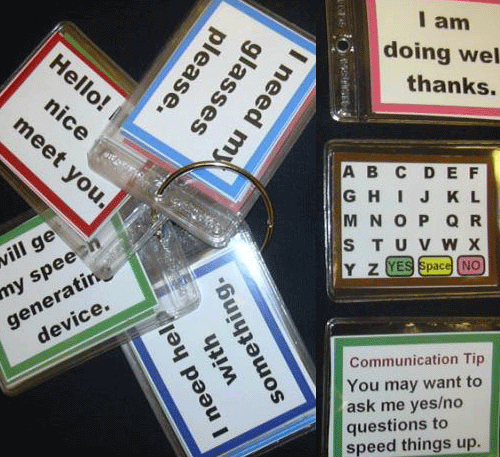
Finally here is The Ring a set of 20 mini-communication boards held together on an "O" ring.

Thursday, May 24, 2007

Special Needs Camping

TLWMSN will have no new posts during Memorial Day weekend so I can go camping. Since I have camping on the brain, today I provide you with links related to accessible camping.

First of all I want to let you know that all U.S. Citizens with permanent disabilities, certified by a doctor, are entitled to an America the Beautiful Access Pass. This pass allows them and everyone in a car with them to get into U.S. National Parks for free.

Equipment
Articles

Wednesday, May 23, 2007

Creating a Tactile Schedule Board

Although there are other ways to create a texture based schedule board, I am going to share with you how I did it for one student. This student was blind, had CP and moderate to severe cognitive challenges. The student needed a schedule board to help decrease behaviors around transitions and was capable of using abstract textures/tactile sensations to represent ideas like "physical therapy" or "pre-vocational activities".

The student had previously been using texture symbols as a teaching aid to learn complex information and had enjoyed the process of choosing the textures to match certain items or concepts. I considered two different commercial textured products, because we had already used all of the textured items I could readily put my hands on for his other symbols. The commercial products I considered were Teachable Touchable Texture Squares by Super Duper, Inc. (above) and the Sensory Discrimination Kit by Enabling Devices (left). The Sensory Discrimination Kit provided eight 3x3 inch texture squares for $69.95 and the Teachable Touchable set gave me 2 each of ten different texture squares that were able the same size but soft puffy pillows instead of hard plastic squares and they came in a cloth carrying bag for $19.95. I went for the Teachable Touchables, especially since this was coming out of my pocket.

Once the Teachable Touchables were delivered my student and I sat down and he assigned a different meaning to each of the textures (e.g. the net like one was PT and the corduroy one was OT) with some cues. We practiced matching the textures to the meanings for awhile and then I secured Velcro the backs of each texture.

I already had an Enabling Devices Go! Board in the room that I was not using, so I decided that would work fine. However, if that were not available foam core board covered in clear contact paper would have been worked or even a strip of sanded, painted wood or, perhaps, taped and painted tri-wall. Go! Boards that do not talk with 2x2 inch squares run for about fifty dollars, the Talking Go! Board with the 3x3 inch squares is about $173.00. The foam board, wood or tri-wall is much cheaper.

The Teachable Touchable squares fit fine on the 2x2 inch Go! Board. Now all that needs to be done is to arrange the texture symbols in order each morning and use the texture schedule board with the student the same way a sighted child would be guided to use a visual schedule.

Tuesday, May 22, 2007

AT Wiki

Need more information about Assistive Technology? Check out the AT Wiki.

Know a lot about Assistive Technology? Add to the AT Wiki.

Monday, May 21, 2007

Adding Choice-Making to Priory Woods Switch Videos

I am sure by now you are all fans of the (free) Priory Woods Music Videos designed to be used with a switch and/or touch screen. I have one student in particular who loves them. He generally accesses the computer by using a touch window. He cannot visually locate target on the screen to use a touch window by looking at it, but he has memorized where on the screen to touch to make certain things happen in certain programs. I wanted to find a way for him to be able to choose which Priory Woods Music Video he sees/hears.

I did this using Jim Luther's free special needs application Launcher 6. Launcher 6 is designed to be used by special needs students to more independently access a computer. It offers a choice of six on screen buttons each of which can launch a program or Priory Woods video. Launcher 6 blocks the student from getting in to things he or she should not (although I would still take the keyboard away, my student did manage to find his way in). Programming Launcher 6 is simple. You assign each square a program or video to open and then assign it a corresponding picture. In my case the pictures are more for my benefit, but my student can already find, by screen location, the Grease video and what he calls, "A bird!", which is a touchscreen game with nature noises called Touch Circles. If you wish your student to have more than six programs or videos to launch you can link different launcher boards together. If using Priory Woods videos you will need to choose videos that are switch only, unless your student can navigate the selection method page using his or her selection method.

You will also need to either set up another switch programmed to act as the "esc" button, which minimizes the videos allowing the student to get back to launcher (no need to close the video, just escape to minimize and touch/click on Launcher 6 in the background to bring it forward), or you will need to keep an eye out and periodically walk by and hit escape to minimize the videos. I strongly recommend headphones, unless you are more tolerant than I am of "the bird!" and the Grease song playing over and over and over and over... .

Launcher 6 will also scan for use with one or two switches and can be used with a mouse or mouse emulator, or intellikeys as well as the touchwindow. There are options to use recorded sounds, including recording a voice, to make it an audible scan, if needed.

Comment or e-mail with questions.

Contact Me at:

Contact Me at:

Visit our advertisers:

Fujitsu Computer Systems Corporation SpinLife.com, LLC Try Nick Jr. Boost FREE for 7 Days LabelDaddy.com ... Label the things you love !! Build-A-Bear HearthSong - Toys Outlet