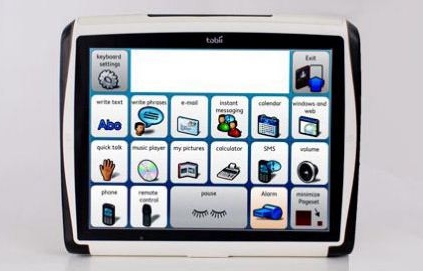
Every few months I receive an e-mail from somewhere in the world, usually from a parent, occasionally from a teacher, about a student who has just received or is about to receive a very expensive AAC (augmentative/alternative communication device). Invariably the e-mail tells of how the child has or is getting this new device and it is the
wrong device for him or her. This baffles me because there are more than thirty companies selling dynamic display AAC devices (see left) and even more selling access systems and low tech AAC. Here are the most common reasons why the device is wrong for the child:
- the device is far too complicated for the child
- the device is far too simple for the child
- the parent/teacher/speech therapist does not know what to do with the device and will not be getting any training
- the child does not want a device/wants nothing to do with the device
- the device is not physically accessible to the child (does not scan, did not come with key guard, etc)
- the device would have been ok, but has been programmed poorly
- the device would have been ok, but has never been taken out of the box
- the child cannot see the screen/text/icons and the device does not have auditory prompting/auditory prompting has not been programmed
- the device is too heavy/is not portable
- the device cannot be seen in the sun
- the battery life is too short
- the child has severe aggressive behaviors and the device is likely to be destroyed
- the device has not be trialled with the student in real life settings
Here are the reasons why the child is getting the wrong device (according to the e-mails):
- "they were sick of waiting" (and now they will have to wait five more years for insurance/the school district/etc to pay for the right device)
- "they are getting everyone the same device" (flavor of the month)
- "the sales rep told us this was the right device for him" (of course they did, their job is SALES)
- "the other devices were too expensive" (aka they didn't want to take the time to do all the paper work to get funding for a more expensive device or they don't believe in this child enough to do the work for him or her)
- "they don't need a trial because he is so good at PECS" (passing pictures isn't the same as dynamic display with voice output)
- "they will teach her not to throw it" (I believe AAC decreases negative behaviors, but you don't start teaching that with an $8,000 device)
- "I think the specialist ordered it because she wants to play with it!" (we all like tech gadgets, but that isn't a good enough reason to order the wrong device for a child)
- "they were trying to be helpful" (see the end of this blog entry for an example)
In the end, like everything in special education, parents need to be out there advocating for their children. They need to "believe but verify" when the experts gives them information. When it comes to something as important as communication it is best to have a second and even a third opinion.
Here are my choosing an
AAC device tips for parents/advocates:
- Make sure the person/team evaluating your son or daughter for an AAC device is an expert at three things 1) speech/language and cognitive development, 2) current AAC and access options and 3) your child.
- Don't trust sales representatives, while they are generally good and well meaning people; they are sales people whose goal is to sell. Definitely don't trust sales reps if they have been selling for less than three years or cannot answer questions about the device (for example we asked one company rep about eye gaze tracking and he brought us the Smart Nav which is head tracking not eye gaze tracking and in the same session he told us it was not possible to program random responses so I had to log onto the knowledge base and show him it was). A sales person has no part in an AAC evaluation.
- Make sure that the process of choosing a device, an access system and a mounting system is done by the assessment/educational team.
- If the sales rep tells you something new is coming out on the market call or e-mail research and development (not just different sales reps) at the company to verify that information.
- Never order anything blind, get rentals or trials of everything, from the AAC device itself to the access system (switches, eye gaze device, morse code controller) to the mounting system and take data. The perfect AAC device is nothing if it is too heavy to carry for two hours at the mall or if the mount keeps slipping and it droops to the floor every 45 minutes.
- Make sure the batteries will last as long as you need them too and find out if a spare battery pack (or two or three) is an option or perhaps if it can run on a power chair batteries and if so what accessories you need.
- Make sure you are choosing the best means of access. If eye gaze is best, don't settle for scanning because the device the specialist knows the most about doesn't have a fire wire port, instead explore the 30+ links to the left for companies that sell a device with similar or the same software and a fire wire port. I promise you someone out there sells a device that can be matched with the software, access system and mount your child needs.
- Once you have the sample device set up the way your son or daughter will use it and try it out, have several conversations and see how it goes. Is the interface user friendly and intuitive? Is the access method simple, will it cause fatigue? Can you find or create important messages? Can you see the screen? Do you like using it? Is it meaningful? Is it fun?
- Keep reminding the team that you are willing to take the time to get this right, so long as they are doing their jobs (trying devices, taking data, teaching access and language skills, etc). Remind them that once your child has the device he or she is "stuck" with it for five years (the least amount of time it takes for another device to be funded)!
To paraphrase someone on a listserv I am also on: Don't just think outside the box, nail it shut and stand on it so you can see better!