- prices would reflect what the device costs to research, develop, manufacture and distribute - not the highest price health insurance or medicaid will pay
- every device would weight less than 4 pounds
- a carrying handle would be integral to every design
- every device would be durable enough for 16 hours a day of daily use every where they might be used
- devices would automatically back up - their to the "cloud" or to an external hard drive or other computer
- there would be a small display showing what the user is working on so the communication partner is in the know or there would be, at the very least, an LED light that signaled a message is being created and to wait
- all devices would have hot swap batteries (kudos to the Zygo Optimist for being the first in the field and to the Tobii for using on all their C series devices)
- all devices would have external volume controls
- their would be a search feature to make finding and linking boards less of a chore
- instant skype or video chat with tech support on the device
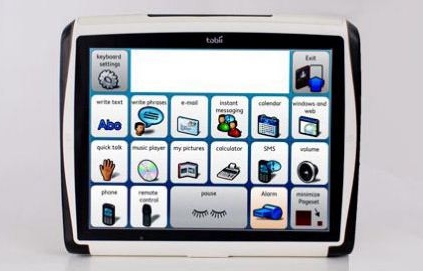
- front and rear video/still cameras with adjustable aim (I have more pictures of ceilings taken by my Tobii user!)
- everything integrates with everything - compose your message and then speak, text or email it all from the same place (Dynavox does this well in the InterAACt software)
- consistent symbol set use within communication board software (no mixed sets)
- built in user communities where users can talk to other users while using their devices
- a means to strip personal information from boards and board sets to be able to share them confidentially
- AAC companies working with curriculum companies so that board sets relating to theme unit or subjects can be purchased and installed
- integrated access to the web regardless of access method (yes, I know that is a big dream)
- speech banking for those with progressive disorders so that early implementation can be for banking speech which is then available when needed for the user
- high tech PODD sets (that I don't have to make myself)
- online board/page creation and back up
- quick printing of the board/pages on the device to make manual backups
- integrated alternative assessment features
- DAISY/AMIS reader (good job Dynavox)
- integrate with Bookshare
- glare proof screen
- data collection and analysis on device use, access, language used, etc.
- water resistant designs
- usb ports, lots of them, and not in hard to reach places
- bluetooth/SMS/MMS/E-mail/wi-fi all built in (most devices have this in the "open" version)
- instant on and instant off features
- media features in the communication software that allow full control over media (flip through album covers, choose songs and movies, etc)
- plenty of memory for storing music, movies, etc
Resources and ideas for teachers of learners with severe, profound, intensive, significant, complex or multiple special needs.
Showing posts with label AAC. Show all posts
Wednesday, July 11, 2012
If I Were in Charge of Research and Development at an AAC Company...
Friday, July 6, 2012
Coming in September 2012 - All Accessible iPad from Ablenet
(below is directly from the Ablenet website.)
Keynote™
Enabling the iPad for everyone.
Product will be available September 2012- HiFi stereo amplified sound output
- Wireless and wired switch access with scanning capabilities to control the iPad and apps supporting VoiceOver controls
- Sleek outer casing protects against moisture and impact
- Integrated battery, charging and iPad syncing
- Updatable firmware to add new features as they are available
- MSRP $349.00
Saturday, January 28, 2012
Switch Access to iPods/iPads Expands
![]() |
| iPortal Accessibility |
Control the iOS Device with Switch(es)
- iPortal Accessibility allows users with certain brands of power wheelchairs to use their driving mechanism (joystick, switches) to control all aspects of an iPhone
Control Music on iOS with Switch(es)
- iScan MP3 single switch (visual based) scanning of the music on your iPod (the picture is deceiving - it does work with current versions of the iPod)

Ablenet Hook - Ablenet Hook auditory scanning of music with one or two switches designed to be adjustable in terms of cognitive load
- Adapted 2 Switch iHome a two switch controller of an iHome dock for iPods
- Adapted 6 Switch iHome an adapted iPod dock system with switches for every function
- Big Button iPod Remote is a console of large switches that access music on the iOS devices
- Scan 5 is a console of switches that control iOS and include scanning, Select 5 is the same thing without scanning
- iPod Switcher is another remote console, it has 3 built in switches to control music
- RJ Cooper iOS Super Switch and Switch Interface
- works with the following apps
- Ablenet Blue 2 Switches with External Switch Ports
- works with the following apps
- Switchamajig turns your iPad into an adaptive remote control for adapted toys
- Attainment SWITCH is an app that turns your iPad into one or two switches to access any program on a Mac or PC and some apps on another iOS device wirelessly
A Request to App Developers:
- please make your apps switch accessible
- please demand that the makers of switch interfaces add non-proprietary switch settings to their interfaces (i.e. make all iOS switches/interfaces compatiable with all accessible apps and let customers choose your switch or interface based on the quality of construction and the design of the product not which one gets more bang for the buck in terms of which apps it controls)
- when choosing non-proprietary switch setting to run your app consider using standard keystrokes that can be sent via a bluetooth keyboard (i.e. arrow keys, tab/enter), switch interface makers will eventually have to add these if you insist on them in your apps
- please be sure to make your apps auditory scanning as well as visual scanning
Friday, November 25, 2011
Core Vocabulary Learning
Here is a new project: Core Vocabulary Curriculum. It will focus on learning 30 or more core vocabulary words through symbols and auditory language. It will focus on one to two words a week. The idea is to embed this into normal routines with one or two lessons about the word/symbol meaning as well. Here is a sample of what is coming, The Core Vocabulary Learning Book which I am posting below. Please share your thoughts and ideas!
In case you don't have Boardmaker, Communicator or some other program here are Core Vocab Cards in PCS and SymbolStix. Email for the Communicator file (.cdd).
Finally here are core word communication boards in Arasaac, PCS and Symbolstix. Email for the Tobii Communicator file (.cdd).
View more presentations from Kate Ahern.
If you have trouble with SlideShare here it is in Google Docs.
In case you don't have Boardmaker, Communicator or some other program here are Core Vocab Cards in PCS and SymbolStix. Email for the Communicator file (.cdd).
View more presentations from Kate Ahern.
Finally here are core word communication boards in Arasaac, PCS and Symbolstix. Email for the Tobii Communicator file (.cdd).
View more presentations from Kate Ahern.
Monday, October 10, 2011
First Dynamic Display AAC Device in India
Avaz is a new dynamic display communication device in India. It is a fully featured speech generating device which works both as a text and/or a symbol driven device. It uses the SymbolStix icon set and has many options for set up. It is accessible via mouse, touchscreen, switch scanning and mouse emulators. Surprisingly the device is in English only, although you can record speech in any language if need be. The website does not list a price but states the Avaz is 5% the cost of a PRC, Tobii or Dynavox. They also have a program of volunteers and sponsors who can sponsor a device for a child in need. (Wouldn't it be great of the companies in the US did that? Actively pursued sponsors for individuals who didn't have any other funding?)
Sunday, September 25, 2011
New AAC Device - The Papoo Touch
The Papoo Touch is a unique new communication device. It combines text and symbol based communication with multi-media capabilities. The Papoo Touch, from France, runs board sets from The Grid 2, a popular AAC program. It also provides text-to-speech through entering text. Text can be entered through typing or by writing on the screen with a finger. As for it's multi-media capabilities they include music and video players as well as video games. It is also multilingual working in English, French, Italian, Spanish and German. 
The Papoo Touch weighs just under 5 ounces. It is 6 by 3.5 inches and about 1 inch thick. It can be operated with one or two hands using the touch screen or a switch. It comes with a USB cable for syncing to a PC, Mac or Linux computer and for charging as well as a neck cord. The volume from the built in speakers can reach up to 80 feet. The batteries last for 3 hours of speech and 48 hours on standby.
Saturday, September 24, 2011
Carrie Communication Cards
Carrie Communication Cards are a new product coming out from Super Duper in December 2011. They are color-coded 2.5 x 2.25 inch plastic cards that use the SymbolStix Symbol Set. They have a pre-punched hole for carrying on a key ring. One side of the card has a color symbol and English word, the other a gray-scale symbol.
These cards will be useful for instruction, cueing, games and more in the classroom. They will be especially useful for working with students who are learning SymbolStix Based AAC Programs like a Tobii, Proloquo2Go, TouchChat or Saltillo's Chat Series.
My only wish (besides having 2 or 3 sets for my classroom) is that Super Duper add a "Core Vocabulary" set of cards to the 22 other sets that come in Carrie Communication Cards. And maybe that the cards be magnetic.
Carrie Communication Cards will retail at $249.99.
(The information below is taken directly from the Super Duper page.)
These cards will be useful for instruction, cueing, games and more in the classroom. They will be especially useful for working with students who are learning SymbolStix Based AAC Programs like a Tobii, Proloquo2Go, TouchChat or Saltillo's Chat Series.
My only wish (besides having 2 or 3 sets for my classroom) is that Super Duper add a "Core Vocabulary" set of cards to the 22 other sets that come in Carrie Communication Cards. And maybe that the cards be magnetic.
Carrie Communication Cards will retail at $249.99.
(The information below is taken directly from the Super Duper page.)
The 22 card categories include:
|
|
|
Carrie Communication Cards includes:
- 740 color-coded cards (2"x 2¼")
- Instruction Booklet with ideas for use
- 5 key chains with rings
- Black briefcase for easy transportation
Wednesday, September 14, 2011
V-Pen AAC Now in USA
I have been gazing with longing at the V-Pen (from Unlimiter) system for sometime now. Until recently it was not available in the United States, however PCI has begun to carry it. The V-Pen is an electronic talking pen which "reads" letters, words or symbols from a paper. It comes with two spelling boards and seven adhesive stickers. You can also purchase a V-Board of symbols and VoiceInk software to make your own boards. VoiceInk boards can also be accessed using the free VoiceInk app on an iPad. The integrated system is called Uni-Tech. Both the VoiceInk boards and the software use the PingPong Boy Symbol Set (also from Unlimiter). Check it out in the video:
Sadly it is possible that the V-Pen system has made it to the USA too late. The price point for the pen and boards is $1,499.95 and the software adds another $499.95 to that. For that price you can buy an iPad2 with Proloquo2Go AND TouchChat plus a stylus and portable speakers. The tablet movement may be out too far ahead for the V-Pen to take hold.
If you are tied to the idea of a board and pen system you can try using the AnyBook Reader
plus stickers (with is about $55.00 with extra memory) on a communication board you make with Boardmaker or SymbolMate or even Microsoft Word and Google Images.
Sadly it is possible that the V-Pen system has made it to the USA too late. The price point for the pen and boards is $1,499.95 and the software adds another $499.95 to that. For that price you can buy an iPad2 with Proloquo2Go AND TouchChat plus a stylus and portable speakers. The tablet movement may be out too far ahead for the V-Pen to take hold.
If you are tied to the idea of a board and pen system you can try using the AnyBook Reader
Thursday, August 18, 2011
Wednesday, April 27, 2011
PODDtastic!
PODD. PODD or Pragmatic Organization Dynamic Display is a both a method of communication/method of teaching communication and a set of manual communication books. PODD was created by Gayle Porter in Australia. PODD materials are arranged especially to be used for social interactions (pragmatically). Messages in the PODD flow from one page to the next by way of page numbers that guide the user through a conversation. So a conversation can move easily through conversational turns.
Wow! First of all if you ever get the chance to attend a workshop Linda Burkhart presents you should go. Second of all it is seeing videos of PODD in action that really "sells" it for use with our students. The first thing I did when I came home from the conference was apologize to our SLP. The second thing was to lay out a plan to introduce PODD into my classroom. PODD really is everything that people who use it rave about, but it can be hard to tell that from reading descriptions and looking at pictures. If you really want to see what PODD is about you should start by going to YouTube or a similar video site and watch videos of PODD in action.
PODDs are intended to be as much for receptive communication as they are for expressive communication. Communication partners of individuals using a PODD also use the PODD to communicate. Modeling or Aided Language Stimulation happens constantly as both communication partners use the PODD. For the first it pretty much only adults used the book. Eventually our student started to internalize the way PODD worked and communicate with us using it.
The only way to purchase PODD right now, in the USA, is from Mayer-Johnson as a Boardmaker Add-on. It costs $325 (in addition to the cost of Boardmaker if you don't already have it). You will have to customize, print and bind the PODD books yourself. The PODD boards that are available for purchase are designed for direct selection. It is possible to customize these yourself for visual, auditory or multi-sensory scanning or other means of access. Gayle Porter, Linda Burkhart and others are working on creating alternative access PODD materials to sell.
PODD can also be a great bridge to high tech dynamic display communication. In our school we have modified it on a Tobii C-eye for a student who communicates through eye gaze and on Proloquo2Go on an iPad for use with direct selection. (I am waiting with baited breath for Proloquo2Go to add two switch scanning so the student described above can user his iPad to talk!) Currently using PODD on a high tech device means doing all the programming yourself, but it is worth it. I have chatted with a few high tech AAC vendors about PODD being available as a vocabulary set, but currently none of the vendors has plans to do so (at least that they were willing to share with the likes of me!).
You can read more about PODD from Linda Burkhart's website and handouts. She also has a great hand out about using PODD with Partner Assisted Scanning, the hand out is meant for working with those who have Rett Syndrome, but applies to most, if not all, situations in which you would use partner assisted scanning. Novita also has a great website about PODD.
As you begin or continue to use PODD I think these tips from The Tasmania School of Special Education are important to remember:
"Using the PODD book………. “go with the zen of the book”
- Don’t become overwhelmed by the size and organisation of the book, stress about where to find a specific vocabulary item, or worry that the child will not be capable of navigating through all the levels. The child doesn’t have to navigate the levels. The partner can make the level changes for them.
- Always begin on the front page with a pragmatic branch starter
- Follow the numbers to get to the end message
- Follow the operational commands
- DO NOT TURN PAGES ONE AT A TIME LOOKING FOR VOCABULARY. If the child sees others do this that is what they will do.
- Go back to page 1 at the end of each message.
- Re-auditorise or ‘re-cap’ the message when your partner is selecting symbols or when you are moving between multiple levels in order to keep the message ‘current’."
The only way to purchase PODD right now, in the USA, is from Mayer-Johnson is as a Boardmaker Add-on. It costs $325 (in addition to the cost of Boardmaker if you don't already have it).
- Don’t become overwhelmed by the size and organisation of the book, stress about where to find a specific vocabulary item, or worry that the child will not be capable of navigating through all the levels. The child doesn’t have to navigate the levels. The partner can make the level changes for them.
- Always begin on the front page with a pragmatic branch starter
- Follow the numbers to get to the end message
- Follow the operational commands
- DO NOT TURN PAGES ONE AT A TIME LOOKING FOR VOCABULARY. If the child sees others do this that is what they will do.
- Go back to page 1 at the end of each message.
- Re-auditorise or ‘re-cap’ the message when your partner is selecting symbols or when you are moving between multiple levels in order to keep the message ‘current’."
Monday, April 18, 2011
AnyBook Reader -Off the Shelf Adaptable AT
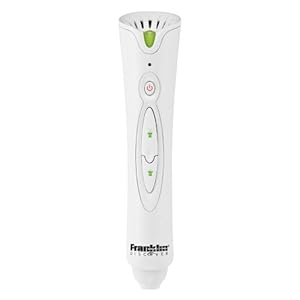
The Franklin AnyBook Reader
is designed to make any book and interactive, "read to me" book. Essentially you attach special stickers to the pages of books and then when you touch the pen to the sticker it plays back a self-recorded message.
The Franklin AnyBook reader could be used in so many ways for learners with multiple special needs. Here are a few I have thought of:
You can even check out the AnyBook Reader Blog.
The Franklin AnyBook reader could be used in so many ways for learners with multiple special needs. Here are a few I have thought of:
- use with manual communication boards as a mid-tech AAC device
- use with visual schedules or task strips as a prompting device
- use with social stories as a means of independent access to text for non- or early readers
- use with a cookbook to read recipes
- use to say the Pledge of Alligiance
- use for sequencing activities - be it math, phonemes or story sequencing
- use to label colors for those with visual impairments
- use to record messages from home to school and back
You can even check out the AnyBook Reader Blog.
Thursday, April 14, 2011
Eyegaze for Education: Women and Girls with Rett Syndrome
Many thanks to the Rett Syndrome Association Massachusetts for hosting me for this presentation.
Also thank you to everyone who watched the live broadcast of this workshop on Ustream.TV!
I apologize for the technical difficulties. It was a first time thing, broadcasting a workshop and I learned a lot.
Ingrid Harding of Girl Power 2 Cure taped (most) of the broadcast, which is seen below.
Please comment and let me know if you saw the broadcast! (I never saw the social stream.)
Sunday, March 20, 2011
Guest Post: iPad AAC Apps Key Guards
Guest Post by Ricky Buchanan of ATMac
The American company Lasered Pics is now making keyguards available for the iPad. Keyguards are available which conform to the shape of the standard iPad keyboard and special-purpose keyguards for Proloquo2Go, TapSpeak Choice and Speak It! are also available. All iPad keyguards are made from 1/8″ (0.3cm) thick clear acrylic and come with optional 1/16″ (0.15cm) bumpers which can raise the keyguard above the screen to prevent accidental touches.
Standard iPad keyboard guards come in both landscape and portrait orientations and will suit QWERTY, AZERTY and QWERTZ keyboard layouts.
Proloquo2Go keyguards are also available for both portrait and landscape orientations and keyguards can be ordered that suit all current Proloquo2Go options including standard and large toolbar sizes, and optionally “wide” mode. Tap Speak keyguards can be made to suit 2-56 items and also come in portrait and landscape orientations. Speak It doesn’t have any layout options available at the moment. Lasered Pics report they will be designing a keyguard to suit Proloquo2Go’s word prediction mode keyboard, and are also working on keyguards for additional AAC apps.
Lasered Pics keyguards can be used with the standard Apple iPad case, with no case, or with any other case that does not obstruct the front of the iPad. The website advises that the current keyguards will not fit properly when used with the OtterBox iPad case.
Keyguards are smaller than the iPad’s full size so they should fit both the original iPad and iPad 2 with no problems.
Steve from Lasered Pics has advised me that anybody wanting a keyguard for a different iPad application should contact him via the website. He couldn’t give me a price for a custom keyguard as it depends on too many factors, but it can certainly be done.
Standard iPad keyguards cost US$19.95 each, but until 31 March 2011 you can get a 10% discount for ordering 2 or more TapSpeak keyguards – use the promo code TAPSPEAK when checking out!
Both Lasered Pics and FRS-Solutions will also make custom key guards!
The American company Lasered Pics is now making keyguards available for the iPad. Keyguards are available which conform to the shape of the standard iPad keyboard and special-purpose keyguards for Proloquo2Go, TapSpeak Choice and Speak It! are also available. All iPad keyguards are made from 1/8″ (0.3cm) thick clear acrylic and come with optional 1/16″ (0.15cm) bumpers which can raise the keyguard above the screen to prevent accidental touches.
Proloquo2Go keyguards are also available for both portrait and landscape orientations and keyguards can be ordered that suit all current Proloquo2Go options including standard and large toolbar sizes, and optionally “wide” mode. Tap Speak keyguards can be made to suit 2-56 items and also come in portrait and landscape orientations. Speak It doesn’t have any layout options available at the moment. Lasered Pics report they will be designing a keyguard to suit Proloquo2Go’s word prediction mode keyboard, and are also working on keyguards for additional AAC apps.
Lasered Pics keyguards can be used with the standard Apple iPad case, with no case, or with any other case that does not obstruct the front of the iPad. The website advises that the current keyguards will not fit properly when used with the OtterBox iPad case.
Keyguards are smaller than the iPad’s full size so they should fit both the original iPad and iPad 2 with no problems.
Steve from Lasered Pics has advised me that anybody wanting a keyguard for a different iPad application should contact him via the website. He couldn’t give me a price for a custom keyguard as it depends on too many factors, but it can certainly be done.
Standard iPad keyguards cost US$19.95 each, but until 31 March 2011 you can get a 10% discount for ordering 2 or more TapSpeak keyguards – use the promo code TAPSPEAK when checking out!
Website: iPad Keyguards
Guest post by Ricky Buchanan of ATMacBoth Lasered Pics and FRS-Solutions will also make custom key guards!
Friday, February 25, 2011
Wednesday, February 23, 2011
Saturday, February 19, 2011
Symbolstix are Everywhere!
Over time the default picture symbol set used for curriculum support and communication in special education is becoming SymbolStix. Originally designed for use in News-2-You, the current event based curriculum for special needs, SymbolStix are now available in many products. Some special education programs are moving to SymbolStix instead of other picture symbols in order to offer a consistent symbol set across many materials and programs.
Here are some of the many places you can find SymbolStix being offered for curriculum and communication:
Curriculum and Software:
Overlays and Manual Communication Boards:
Here are some of the many places you can find SymbolStix being offered for curriculum and communication:
Curriculum and Software:
- Click to Read Life Skills Stories is a software program designed to teach core vocabulary and social skills as well as early literacy through stories and games, includes switch access $49
- Clicker5 and ClozePro multimedia authoring software allowing teachers, therapists and caregivers to design learning activities in all curriculum areas, SymbolStix are now available as an add-on package
- Environmental Print Program Levels One and Two are integrated language arts programs focusing on comprehension and instruction of safety/community signs, includes software $699
- PCI Reading Program is a researched reading program using sight word instruction for individuals with moderate to severe learning disabilities/special needs $629
- News-2-You is a current events program for students with special needs
- Unique Learning Program is a comprehensive and differentiated, standards aligned curriculum for students in elementary school through adult who have moderate to severe special needs $140 a classroom, a year
- SymWord is a talking word processor with symbol support and the ability for users to use grids of symbols to write, also works as an email program with symbol support and to create symbol supported materials. Access includes switch scanning and mouse alternatives. $195
- Word Problems for Non Readers is three levels of math story problems designed for students to address math skills without literacy, Banking for Non Readers is a continuation focusing on financial skills $49 a level
Overlays and Manual Communication Boards:
- AMDi Overlay Designer Pro allows users to make custom overlays for AMDi mid-tech communication devices like the Tech/Talk and manual communication boards, it includes a flash disk burner for use with the AMDi Smart Series $258
- Go Talk Overlay Designer is sold by Attainment and can be used to make Overlays for the Go Talk series of mid-tech AAC devices as well as manual communication boards and books $79
- Matrix Maker is a communication board making software that had overlay templates for many mid-tech communication devices, worksheets, visual schedules and more $230
- Pogo Boards is an online communication board design program $69 a year
- Symbol Mate is a complete board making and curriculum materials solution from Tobii $200
- SymbolStix Online is a web based subscription that allows you to search all the available SymbolStix, including new ones that many not be in other software programs you use and download those symbols to use in other programs $99 a year
- Communicator from Tobii is a dynamic display AAC, environmental control and internet communications software program that comes standard on Tobii devices and is offered on other company's devices as well, SymbolStix is the default symbol set
- Cyrano is a handheld dynamic display device, SymbolStix are available as an add-on
- Saltillo makes the ChatPC and ALT-Chat series of dynamic display communication devices, these devices are small and rugged, SymbolStix is the default picture symbol set
- MindExpress is a dynamic display communication software program which now offers SymbolStix, you can find it on software like the AAC devices from Jabbla
- The Grid is a symbol and text based AAC system in addition to alternative computer control, it is offered on my communication devices, SymbolStix is an add on purchase
- ArtikPix is an app to assist with teaching articulation through flashcards and games $29.99
- iCommunicate is a visual cueing and choice making app $34.99-$49.99
- Parlerai is a simple dynamic display solution offered along with other features on the Parlerai website $29.99 a month
- Proloquo2Go is a complete iPod/iPhone based dynamic display speech system $189
- TouchChat is Saltillo's AAC app, using the same researched vocabulary sets as their stand alone devices $140
Update May 2022 - Symbol Support Text has been proven not to prove much, if any, aid to comprehension and to be detrimental to learning to read. This post is keep up for historical purposes. Please don't use symbol supported text.
Tuesday, February 1, 2011
Overseas Products I Wish I Could Find In the USA
- V-Pen
- The V-Pen is a mid tech AAC solution
- It uses special coding to allow the V-Pen to speak messages that correspond with paper
- You can use a variety of pre-made manual boards or make your own with special software
- Recordable Bar
- with six buttons and ten seconds of recording per button this would make a perfect visual schedule at $25.00
- Look2Talk Complete
- a complete set of materials and guides to creating, teaching and using low tech eye gaze communication boards
- The Talk Time Range
- A variety of products that allow recording a voice and hearing it played back
- Includes a talking block (to use as a dice), switches and dry erase boards (Mayer-Johnson does carry a couple of these items.
- StoryBoards
- a set of pictures and story telling boards to allow students to "write" and tell a story
- reinforces time concepts as it is used
- Eyegaze Frame with Picture Print Software
- a transparent eye gaze frame and specialized software to print symbols for it
Sunday, November 7, 2010
Things you never thought you would say...
One of my tutoring students is a late bloomer in terms of AAC. It wasn't until 17 when he received his first dynamic display device, a Tobii C-Eye.
Six months later he was hanging out in his kitchen with a friend, blasting Shania Twain on his iTunes, through her Tobii.
"That's too loud; turn it down!" his mother told him. Like any other teen would he turned it down, but just a little.
One of the best gifts of AAC and accessible environmental control is a chance to be like any other kid. Not to mention the chance for a parent to be like any other parent.
Six months later he was hanging out in his kitchen with a friend, blasting Shania Twain on his iTunes, through her Tobii.
"That's too loud; turn it down!" his mother told him. Like any other teen would he turned it down, but just a little.
One of the best gifts of AAC and accessible environmental control is a chance to be like any other kid. Not to mention the chance for a parent to be like any other parent.
More AAC Apps Coming to iPad
The world of AAC is opening up even more. A number of new iPhone/iTouch/iPad apps are being added to the broad field of AAC apps in the iTunes App Store.
First TouchChat by Satillo offers the advantages of a well known and widely used AAC system that has been around for over a decade since the original ChatPC on the iDevices. Four vocabulary page sets come with the TouchChat - VocabPC, MultiChat15, Spelling and Primary. A number of other vocabulary page sets can be purchased if more suitable such as Inman Innovations Word Power and PRC's iEssence for literate users. The TouchChat uses SymbolStix symbols with over 8,000 available. TouchChat offers something unique to complete iDevice AAC systems - a sharing site where page sets can be posted and used by others. The TouchChat app is $149 with additional costs for more vocabulary page sets and $59 for six months access to iShare. A Windows based desktop editor is also available for $59, it must be used with a subscription to iShare. This allows off-device programming. The device also offers a choice of five synthesized voices.
Conley Solutions is adding a full AAC app to its Tap Speak Button and TapSpeak Sequence apps. Tap Speak Choices uses Mayer-Johnson Pictures Symbols, allows 1-56 buttons per page, has drag 'n' drop editing and is one or two switch accessible using RJ Cooper's Bluetooth Switch Interace ($99). No price has been listed for Tap Speak Choices nor is the type of speech listed - recorded or synthesized.
Smarty Ears is also offering an AAC app now, although much less compelling than either of those above or the original Proloquo2Go. Smarty Ears AAC app is called Expressive. It uses non-standardized clip art images, many of which are confusing (i.e. verbs is two clasped hands). There are male or female voice options. Expressive is $34.99.
It should be noted that some smaller, innovative health insurance companies, such as Fallon in the Northeast, are now funding iDevice based AAC.
Finally RJ Cooper mentions on his site that ALL of the AAC Apps will be adding switch access.
Conley Solutions is adding a full AAC app to its Tap Speak Button and TapSpeak Sequence apps. Tap Speak Choices uses Mayer-Johnson Pictures Symbols, allows 1-56 buttons per page, has drag 'n' drop editing and is one or two switch accessible using RJ Cooper's Bluetooth Switch Interace ($99). No price has been listed for Tap Speak Choices nor is the type of speech listed - recorded or synthesized.
Smarty Ears is also offering an AAC app now, although much less compelling than either of those above or the original Proloquo2Go. Smarty Ears AAC app is called Expressive. It uses non-standardized clip art images, many of which are confusing (i.e. verbs is two clasped hands). There are male or female voice options. Expressive is $34.99.
It should be noted that some smaller, innovative health insurance companies, such as Fallon in the Northeast, are now funding iDevice based AAC.
Finally RJ Cooper mentions on his site that ALL of the AAC Apps will be adding switch access.
A User Finds a Device
I will admit that I have been a naysayer about Dynavox's new Maestro AAC device. My reasons for my less-than-impressed attitude are two fold.
First I find Dynavox's arrogance repugnant, take for example this quote, "When asked about the iPad at leading communications company, Dynavox, some of the representatives felt the device was helpful, but not to be relied on in assisting those with autism or other special needs." (The Examiner). Really, Dynavox? Really? Since when do you get to decide what can be relied on for AAC? Is it because it isn't a Dynavox or is it (more likely) that someone is offering an AAC solution with a price tag way way under the $8,000 you charge? Everyone knows you charge that price because it is the top price the government will allow you to charge. Tech prices in all other sectors drop over time as components become less expensive, but not for AAC. Proloquo2Go has leveled the playing field for AAC as far as offering a complete language solutions of the same quality or better than the big players in the field at an affordable price. Now well know AAC companies like Saltillo are jumping on the iPad bandwagon, offering AAC solutions for a price users, families and schools can afford. Meanwhile Dynavox proports to be the field of AAC to help those with communication disorders and instead shows the kind of attitude shown in that the quote above (and others like it) which demonstrates what they really care about is making money for their stock holders before helping anyone.
Second I continue to find major faults with Dynavox's software system. Both InterAACt (and Gateway before it) mix symbol sets without regard for the needs of the user, often times the symbols for a single word (i.e. "sorry") is different on the same pages within one system. InterAACt has built in visual display scenes, which are poorly researched for most AAC users (research has found them useful for aphasia and young children with autism, which is only a percentage of AAC users), and those visual scenes are nearly impossible to remove. Additionally InterAACts varibles are hard on those who need keyguards and the "emergent" communicator level lacks important vocabulary like, "feelings". Essentially is is almost easier to program from scratch than it is to reprogram a Dynavox for many users.
Those things remaining true this past week I participated in a Maestro trial for a young adult user. This user is currently using a Go Talk 20+. This users is definitely ready for dynamic display. We were looking for a lightweight device for this ambulatory user to be able to carry which had a large and bright screen and a key guard to assist in access issues for to fine motor control. A number of devices have been trialled unsuccessfully, the PRC Springboard was difficult cognitively, the Saltillo Alt-Chat had a screen which was too dark and too small for our users vision issues, the Xpress was both too cognitively difficult and too small, Proloquo2Go on the iPad didn't have fine motor setting or a key guard that would help with the fine motor issues and the Dynavox V and Tobii C-8 were too heavy.
Since we had a Dynavox rep coming out to demo an Eyemax for another user we asked for a Maestro for this user. I was thrilled to see that the Maestro seems to be a perfect match for our user. It is only .4 ounces heavier than the Alt-Chat, but the screen is large, bright and clear. The key guard eliminated most (though not all) of our fine motor access issues. Thus the only remaining problem was the software (with it's mixed symbol sets and key guard defying variables), thus we choose to make some pages from scratch for our user. The page we mostly used, one we were calling "Bossy Betty" had words like "go", "on", "in", "under", "table", "corner", "outside", "chair", "come back" and "sorry". Thus in what had to be the funniest demo I have ever been to I spent a lot of time under the table, in a chair, outside and in the corner. This was the most communication we have ever seen out of this user in one time.
We will try again with the Maestro next week and then begin the long and arduous trek towards funding if things work out so well again. (And a long trek it will be with that $8200 price tag.)
First I find Dynavox's arrogance repugnant, take for example this quote, "When asked about the iPad at leading communications company, Dynavox, some of the representatives felt the device was helpful, but not to be relied on in assisting those with autism or other special needs." (The Examiner). Really, Dynavox? Really? Since when do you get to decide what can be relied on for AAC? Is it because it isn't a Dynavox or is it (more likely) that someone is offering an AAC solution with a price tag way way under the $8,000 you charge? Everyone knows you charge that price because it is the top price the government will allow you to charge. Tech prices in all other sectors drop over time as components become less expensive, but not for AAC. Proloquo2Go has leveled the playing field for AAC as far as offering a complete language solutions of the same quality or better than the big players in the field at an affordable price. Now well know AAC companies like Saltillo are jumping on the iPad bandwagon, offering AAC solutions for a price users, families and schools can afford. Meanwhile Dynavox proports to be the field of AAC to help those with communication disorders and instead shows the kind of attitude shown in that the quote above (and others like it) which demonstrates what they really care about is making money for their stock holders before helping anyone.
Second I continue to find major faults with Dynavox's software system. Both InterAACt (and Gateway before it) mix symbol sets without regard for the needs of the user, often times the symbols for a single word (i.e. "sorry") is different on the same pages within one system. InterAACt has built in visual display scenes, which are poorly researched for most AAC users (research has found them useful for aphasia and young children with autism, which is only a percentage of AAC users), and those visual scenes are nearly impossible to remove. Additionally InterAACts varibles are hard on those who need keyguards and the "emergent" communicator level lacks important vocabulary like, "feelings". Essentially is is almost easier to program from scratch than it is to reprogram a Dynavox for many users.
Those things remaining true this past week I participated in a Maestro trial for a young adult user. This user is currently using a Go Talk 20+. This users is definitely ready for dynamic display. We were looking for a lightweight device for this ambulatory user to be able to carry which had a large and bright screen and a key guard to assist in access issues for to fine motor control. A number of devices have been trialled unsuccessfully, the PRC Springboard was difficult cognitively, the Saltillo Alt-Chat had a screen which was too dark and too small for our users vision issues, the Xpress was both too cognitively difficult and too small, Proloquo2Go on the iPad didn't have fine motor setting or a key guard that would help with the fine motor issues and the Dynavox V and Tobii C-8 were too heavy.
Since we had a Dynavox rep coming out to demo an Eyemax for another user we asked for a Maestro for this user. I was thrilled to see that the Maestro seems to be a perfect match for our user. It is only .4 ounces heavier than the Alt-Chat, but the screen is large, bright and clear. The key guard eliminated most (though not all) of our fine motor access issues. Thus the only remaining problem was the software (with it's mixed symbol sets and key guard defying variables), thus we choose to make some pages from scratch for our user. The page we mostly used, one we were calling "Bossy Betty" had words like "go", "on", "in", "under", "table", "corner", "outside", "chair", "come back" and "sorry". Thus in what had to be the funniest demo I have ever been to I spent a lot of time under the table, in a chair, outside and in the corner. This was the most communication we have ever seen out of this user in one time.
We will try again with the Maestro next week and then begin the long and arduous trek towards funding if things work out so well again. (And a long trek it will be with that $8200 price tag.)
Subscribe to:
Posts (Atom)