Showing posts with label Special education. Show all posts

Wednesday, July 11, 2012

If I Were in Charge of Research and Development at an AAC Company...

  • prices would reflect what the device costs to research, develop, manufacture and distribute - not the highest price health insurance or medicaid will pay
  • every device would weight less than 4 pounds
  • a carrying handle would be integral to every design
  • every device would be durable enough for 16 hours a day of daily use every where they might be used
  • devices would automatically back up - their to the "cloud" or to an external hard drive or other computer
  • there would be a small display showing what the user is working on so the communication partner is in the know or there would be, at the very least, an LED light that signaled a message is being created and to wait
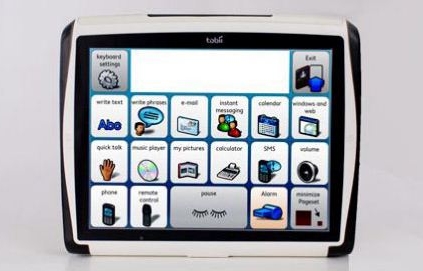
  • all devices would have hot swap batteries (kudos to the Zygo Optimist for being the first in the field and to the Tobii for using on all their C series devices)
  • all devices would have external volume controls
  • their would be a search feature to make finding and linking boards less of a chore
  • instant skype or video chat with tech support on the device 
  • front and rear video/still cameras with adjustable aim (I have more pictures of ceilings taken by my Tobii user!)
  • everything integrates with everything - compose your message and then speak, text or email it all from the same place (Dynavox does this well in the InterAACt software)
  • consistent symbol set use within communication board software (no mixed sets)
  • built in user communities where users can talk to other users while using their devices
  • a means to strip personal information from boards and board sets to be able to share them confidentially
  • AAC companies working with curriculum companies so that board sets relating to theme unit or subjects can be purchased and installed
  • integrated access to the web regardless of access method (yes, I know that is a big dream)
  • speech banking for those with progressive disorders so that early implementation can be for banking speech which is then available when needed for the user
  • high tech PODD sets (that I don't have to make myself)
  • online board/page creation and back up
  • quick printing of the board/pages on the device to make manual backups
  • integrated alternative assessment features
  • DAISY/AMIS reader (good job Dynavox)
  • integrate with Bookshare
  • glare proof screen
  • data collection and analysis on device use, access, language used, etc.
  • water resistant designs
  • usb ports, lots of them, and not in hard to reach places
  • bluetooth/SMS/MMS/E-mail/wi-fi all built in (most devices have this in the "open" version)
  • instant on and instant off features
  • media features in the communication software that allow full control over media (flip through album covers, choose songs and movies, etc)
  • plenty of memory for storing music, movies, etc

Special Needs Glasses


Solo Bambini Glasses

As special needs teachers we get asked questions about all sort of topics.  After all special needs teachers are generalists who need to know a little bit about and awful lot, and a LOT about quite a few things.  Glasses for children with special needs is one of those things that comes up.  Here are some places you may want to direct parents.

Unbreakable Glasses 
  • Miraflex's Flexible and Safe frames are solid, flexible, unbreakable for infants to older children and at least one style for adults.  
  • Solo Bambini offers solid, one piece, flexible, unbreakable glasses for babies through adults. These glasses are also non-magnetic and thus can be worn in MRI machines and by those with programmable shunts or VNS devices.  They also offer other styles and brands of pediatric glasses.
  • Tomato Glasses are light, adjustable,  flexible, shockproof, non-slip and retain the shape of the wearer.  Sizes in infant through adult.


Tomato Glasses


Other Special Needs Glasses


  • Bans offers children's glasses frames in sizes from infant to age 5.  You can have your eye doctor change the lenses. These glasses have a neoprene band to hold them in place instead of arms.  A full array of sunglasses with neoprene bands, including infant sizes available as well.  Also swimming goggles and prescription swimming goggles.  (And hearing protection.)
  • Spokiz has Rx glasses and sunglasses with special inter-changable flexible arms they call bands.  They are supposed to be non-slip, extra durable and help to avoid pressure points.
  • Specs4Us has glasses in all sizes which are specifically designed for children and adults with Down Syndrome.
Accessories

  • Ficklets are glasses charms, super cute and fun!
  • Templelocks slide over the end of the arm of your glasses to help stop them from slipping.
  • Croakies makes a wide range of glasses straps and retainers and other accessories for kids and adults.

Saturday, January 8, 2011

Professional Development Resolutions?

Did you make a new years resolution to improve your practice as a teacher?  Or maybe you need CEUs?  Or you might just love going to conferences?  Here is a list of some places to find professional development for those who teach individuals with severe or multiple disabilities.
The following agencies may offer local conferences or courses:
Other places to find professional development:
  • local children's hospitals
  • local universities
  • disability specific organizations (Down Syndrome Congress, Rett Syndrome Foundation, etc)
  • special education agencies (collaboratives, intermediate units, BOCES, etc) and schools
  • state department of education or disabilities

Sunday, February 8, 2009

Resources for this Week's News-2-You: Westminster Dog Show


This week News-2-You is about the Westminster Dog Show. (Which for some reason makes me think about my thesis adviser.) Here are some resources you can use to extend your lessons.

Photos and Videos
Articles for Kids
Crafts
Adaptive PE
  • Obstacle course designed just for your learners (or with different levels for different abilities) including running/moving fast, jumping/rolling over, turning and more - students with significant physical challenges might enjoy being the "trainer" for typical peer or staff
Sensory/ADLs
  • dog shadow puppets on a light box
  • fill a sensory box with (edible for human consumption just in case) dog bones, dog toys and collars/leashes
  • do some primping like the dogs do - washing hair and blow drying, combing/brushing, nail care, etc.
Don't forget Adapted Learning (there are already activities uploaded) and the Intellitools Exchange.

Wednesday, January 21, 2009

Voicethread and Parents


As some of you have noticed I recently I have put up two Voicethread posts about classroom activities. I am not sure why it surprised me, but tonight I spoke with a parent of one of my students and she loves the Voicethreads! A few commenters and other bloggers have noted that the Voicethreads are a nice way to show what goes on in intensive special needs classrooms and it registered with me, but more as a way to showcase to other teachers some things we are doing, not as a way to show parents what their sons and daughters have been up to in school.

The parent shared that her sister actually viewed the Voicethread about snow before she did and could name the slides that involved her nephew, if only by his hands. How cool! My student was able to be a star. Brothers and sisters of my students get to be online and in local papers all the time, for scouts, dancing, honor roll or sports awards. My students don't make it online or in the papers nearly as often (if ever). While I will never put my student's faces or names online as it is an invasion of privacy and dignity, even if I do have parental permission, just the "hands only" multimedia presentations are enough to give a taste of our daily experiences and make my students stars to their families.

I would expect to see more of these on this site in the coming months!

Monday, January 19, 2009

How to Watch the Inauguration Live (via the web)


Tomorrow I plan to have my class watch the inauguration of our 44th president on the "big screen" which means we must tune in online. Here are some links on how to watch online:

Our class will understand this event at different levels. Some will just tune into the excitement, others will understand we have a new president, still others may understand exactly why this new president is so historic. Here are some ways I plan to increase the interactivity of watching the inauguration and parades.
  • handing out musical instruments, especially "clappers" and "shakers" to use to make noise to go along with applause and recording loud cheers and applause onto step-by-step switches for those who cannot access musical instruments
  • presenting communication boards and overlays for devices to be used while watching - I have uploaded these to Adapted Learning
  • inviting other classes to join us and having the teacher's aides and teachers be as excited as possible
  • turning down the volume on the webcast to explain and ask/answer questions as needed
  • doing follow up activities, including this weeks News-2-You

Tuesday, January 13, 2009

A Calendar for Teachers

Teachervision has a great (and free) calendar for teachers which highlights a historical event or special occasion each day of the year. Download it here.

They also have a website widget that you can add to your iGoogle, Pageflakes or blog which offers a free grade 4 or 5 worksheet a day.

Thursday, January 8, 2009

When Web Pages are Blocked

Before Christmas my students and staff spent a few fun filled afternoon periods playing the web version of Deal No Deal, which was an exciting and educational activity. While playing students worked on partner assisted scanning (I would move the mouse over the suitcases in a 3 second scan for them to pick suitcases with a wireless switch), greater than/less than, and communication skills including answering yes/no questions. They also loved showing their allegiances to various staff by choosing whose advice to take. We tallied up who made the best deals and talked about the value of money. Eventually a friend even made some great Deal No Deal boards for us to use on Boardmaker SDP while playing the game.

Today we returned from a great community based instruction trip about 35 minutes late (due to snow and a pizza that took 35 minutes to be served) and the paraprofessionals in the room decided that they wouldn't mind giving up their breaks if they could play Deal No Deal with the students (which meant I could fill in the data sheets and write daily notes home).

The only catch was that our host school now blocks the Deal No Deal site, which we didn't know until we tried to play. This isn't a huge loss, there are plenty of other fun educational activities we can do, but it does lead one to question why certain web filter decisions are made. Other than my class playing three times was there a problem in the building with kids playing Deal No Deal?

What do you do when sites are blocked in your school?

Vote for Teaching Learners with Multiple Special Needs in the 2008 Weblog Awards. You can vote once a day, every day! (Until January 13th.)

Tuesday, January 6, 2009

New Blogs on the Block

Here are two fairly new Assistive Tech blogs for you to check out:

Both are great sites with lots of promise. Welcome to the AT/Disability/Special Education Blog world guys!

That being said I can't help but notice that in the AT/Disability/Special Education Blog world men seriously out number women, in spite of these corners of the helping professions being dominated by women. I am happy to give a hand out to anyone who wants to start a blog in the field, but I especially would like to see more women bloggers.

Vote for Teaching Learners with Multiple Special Needs in the 2008 Weblog Awards. You can vote once a day, every day! (Until January 13th.)

Monday, January 5, 2009

News-2-You on Adapted Learning

Today another teacher and I discussed how there must be a large number of people on Adapted
Learning (the Mayer-Johnson Sharing Community) who use News-2-You.

To this end I have started a new Adapted Learning Group called News-2-You, my hope is folks will use it to share News-2-You adaptations and extension activities. Please join us.

Vote for Teaching Learners with Multiple Special Needs in the 2008
Weblog Awards. You can vote once a day, every day! (Until January 13th.)

News

First off yesterday's post was number 700!

Secondly voting has begun for the 2008 Weblog Awards. Last year TLWMSN tied for seventh. This year let's put a special education blog in the top five.

You can vote once a day, every day! (Until January 13th.)

Please pass this on to everyone who might want to vote!

Sunday, January 4, 2009

Seizures in the Special Needs Classroom


News of Jett Travolta, John Travolta's son, dying following a seizure leads to thoughts about seizures in our classrooms. Seizures are part of day to day life for many students with multiple or significant disabililites. Students with hydrocepheleus, cerebral palsy, brian injury, Lennox-Gestaut, microcephely and other conditions may have seizures.

  • All staff working with students who have a history of seizures should have a basic understanding of what a seizure is, the types of seizures and how to respond to a seizure
  • Our students may have some sensations (an aura) before a seizure that tells them a seizure is coming; if the student is non-speaking he or she may have certain behaviors that occur or increase before a seizure. It is important to learn about these behaviors in order to enable you to help keep the student safe and provide emotional support.
  • Seizures will look different from student to student. Some may have staring spells or drop seizures, others with having twitching or other movements with a seizure. All staff need to be familiar with the type(s) of seizures a student may have and what to do about them.
  • Staff need to be trained in first aid for seizures. The primary reaction to any seizure will be to keep the student safe. Most people know, in this day and age, not to put anything in the mouth of the person who is having a seizure but we need to be aware that people in the community may try to be "helpful" in this way and stop them. If the student is likely to fall to the ground or has fallen to the ground the area will need to be cleared to prevent injury. Clothing should be loosened and movements should not be restrained.
  • All staff need to know the protocal for reacting to different types of seizures in different students. Every school or program has a different policy for who is to give primary first aid. If educational staff are responsible for administration of medication, like Ativan or Valium/Diastat, they need to be be trained and comfortable before a seizure occurs. Likewise if a student has a VNS (vagus nerve stimulator) the staff needs to know how to use the magnet.
  • All staff must know how to call for emergency response (usually 911) if a student who has no history of seizures has a seizure or if a student who is known to have seizures does not respond the the seizure protocal for that seizure.
  • Staff should stay calm during the seizure, remembering that the student may be able to hear you, speak calmly and say reassuring things, for example, "Hold on, buddy, just keep breathing, you are going to be ok."
  • Following a seizure staff must be respectful that seizures are a part of this student's life, there is no need to describe them using subjective adjectives like, "That was a nasty seizure." Our job is to normalize the lives of our students, not to further stigma.
  • Finally, although schools and programs vary, some record of seizure activitity is usually kept (our program uses a seizure log) and the parent or guardian must be notified.
For more information about seizures:
Children's Book about Seizures:
Books for Teachers and Other Adults:

Friday, January 2, 2009

Free Kido'z Web Broswer

Kido'z is a new web broswer for children, along the lines of the Zac Browser or Kid Zui. It is free to download and ad free. (It is in beta so the coast may change.)

Kido'z runs on Adobe Air and has a smooth clean interface that would make it great for touch screens or interactive whiteboards. There are three main areas: games, videos and websites.

Unfortunately it is not switch accesible, tab/enter does not work nor do the arrow keys. Supposedly it is for children ages 3-11, but I would stick with the 3-7 year old set in order to account for age appropriateness.

January is National Hobby Month


January is Hobby Month and to that end I am creating a unit for my students on hobbies and leisure skills. If you belong to Adapted Learning you can download my boards (and other peoples) by searching "hobby" or "leisure" in the search engine.

Several Websites have ideas for hobby month:
There are also a couple of free leisure assessments online:

Teaching Money Identification by Touch

It has been a few years since I have needed to teach money identification by touch to a student. This method of identifying bills and coins is usually taught to student who are blind or have low vision, but I have also successfully taught this method to learners with brain injury that affects visual and short term memory.

The method is like this:

Coins are identified by three characteristics:
  • Size. The dime is the smallest coin, and the half-dollar is the largest.

  • Edge. The penny and the nickel have a smooth edge. The dime, quarter, and half-dollar have a milled, ridged edge.

  • Thickness. The nickel is thicker than the other coins.
Bills are identified by how they are folded:
  • Leave $1 bills unfolded
  • Fold $5 bills lengthwise ("the long way")
  • Fold $10 bills by width ("the short way")
  • Fold $20 bills lengthwise and then by width ("total fold")

Wednesday, December 24, 2008

Contact Me at:

Contact Me at:

Visit our advertisers:

Fujitsu Computer Systems Corporation SpinLife.com, LLC Try Nick Jr. Boost FREE for 7 Days LabelDaddy.com ... Label the things you love !! Build-A-Bear HearthSong - Toys Outlet
